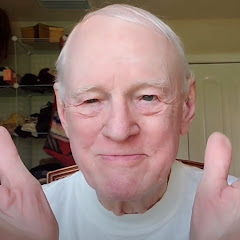
ASMR Grandpa Doing Your Makeup for SLEEP + Words of Encouragement (TAPPING & LAYERED SOUNDS)💄😴
312 k abonnés
145,5 k vuesl’année dernière
Description
Welcome dear one! Grab your cozy blanket and join your fave Grandpa for some makeup time!💄Grandpa tried eyebrow plucking for the first time in this video! We hope you enjoy it! Plus there is extended tapping and scratching paired perfectly with soothing slow hand movements. Get tingly with both natural and layered makeup sounds that will melt away your stress. ✨ Enjoy minimal soft spoken talking and lots of words of encouragement to uplift and comfort your soul. The gentle affirmations and heartwarming message at the end will nourishe your spirit and usher you in to a restful sleep. 🛌💤 🌟 Why You'll Love This ASMR Video: 🌟 1. Minimal Soft Spoken Talking: Dive deep into relaxation with minimal interruptions and quiet moments. 2. Plucking Sounds: Experience gentle, rhythmic plucking that soothes and calms. 3. Extended Tapping and Scratching: Enjoy extended sequences of tapping and scratching for ultimate relaxation. 4. Slow Hand Movements: Follow the mesmerizing, slow hand movements designed to lull you into tranquility. 5. Natural & Layered Makeup Sounds: Relax with the delicate, multi-layered makeup sounds that remind you of the comfort of home. 6. Encouraging Words & Heartwarming Message: Feel your spirit lifted by gentle words of encouragement, culminating with a heartfelt message at the end. Whether you're looking to unwind after a long day or seeking a bit of positive encouragement, Grandpa is here for you. Join him on this relaxing journey, and let your worries drift away!** 🌈💤 📬Stay Connected with Grandpa 📬 Don't forget to hit the subscribe button and join Grandpa Poe's ever-growing family of children and grandchildren from around the world. Your support means the world to us, and it helps us bring more wholesome content your way. 🌍 Watch This Video in Your Language! 🌍 Closed Captions & Auto-Translate Steps: Close Captions: 1. Launch the YouTube app on your phone. 2. Select Grandpa's Video. 3. Tap the screen to bring up the video controls. 4. Tap the three-dot menu (⋮) in the upper right corner of the video. 5. Tap Captions (CC) from the menu. If captions are available, they will be listed here. Tap your language to select it. Auto-Translate Captions (if your language is not listed): 1. Tap the Settings (gear) icon. 2. Select Subtitles/CC. 3. Tap Auto-translate. 4. Scroll through the list and select your language. This will enable captions in your selected language for the video you're watching. Happy viewing! 📺 If you need any more help, feel free to ask! Love, Daughter and Grandpa Poe 💖 #asmr #relaxation #plucking #tapping #scratching #handmovements #makeupsounds #positivevibes #softspoken #calmingwords ASMR Grandpa Doing Your Makeup for SLEEP + Words of Encouragement (TAPPING & LAYERED SOUNDS)💄😴 notrans1Mtagsandthumb